
The Geometry Conversion Library
On this page
Introduction
The Geometry Conversion Library (GCV or libgcv) provides a unified API for geometry conversion capabilities under a plugin-based architecture.
The GCV public API is declared in C headers located within include/gcv/. The single include/gcv.h header includes the entire GCV public API.
Architecture
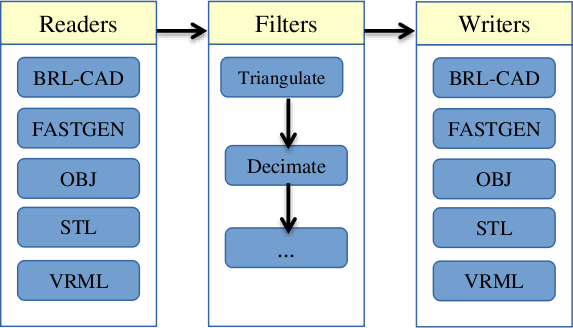
The Geometry Conversion Library consists of a stream-based API for geometry conversion and associated operations. Input and output are provided by "reader" and "writer" converters (provided by plugins). Intermediate operations are provided by "filters". Readers and writers are types of filters that provide input and output support for model formats, while basic filters apply transformations to models and geometry.
Geometry is stored in an in-memory BRL-CAD database (struct db_i in include/rt/db_instance.h) during the intermediate steps of conversion. For writer filters, this database is marked read-only and its geometry should not be modified. All names within a BRL-CAD database must be unique.
Figure 1. GCV architecture
Building GCV
GCV can be built in a similar manner as other BRL-CAD libraries. After configuring with CMake, building the libgcv target will produce a dynamic library. For Unix-based systems, the procedure should be similar to the following:
$ cd brlcad
$ mkdir build
$ cd build
$ cmake ..
$ make libgcv
Plugins can be built under gcv_ plugin_name targets, or collectively under the gcv_plugins target.
The command-line utility can be built under the gcv target. At this time, the gcv program is not installed automatically; the binary will be placed into build/src/conv/gcv/.
Example: Using GCV in an application
The following code illustrates a basic use of GCV from within an application. Note that there may be multiple filters providing import/export capabilities for a given format; the below code simply selects the first matching filter encountered.
Example 1. gcv_app.c
#include "common.h"

#include "bu/log.h"
#include "bu/mime.h"
#include "gcv.h"

/* Convert the file at 'in_path' to the file at 'out_path', selecting the
 * first registered reader and writer filter that match the file types
 * inferred from the two path extensions.  Returns 0 on success. */
int
convert(const char *in_path, const char *out_path)
{
    struct gcv_context context;
    const struct gcv_filter *in_filter, *out_filter;
    bu_mime_model_t in_type, out_type;

    /* Infer the model file types from the filename extensions. */
    in_type = (bu_mime_model_t)bu_file_mime(in_path, BU_MIME_MODEL);
    out_type = (bu_mime_model_t)bu_file_mime(out_path, BU_MIME_MODEL);

    /* A context holds the conversion state, including an in-memory
     * database used for the intermediate representation. */
    gcv_context_init(&context);

    /* Look up a reader for the input type and a writer for the output
     * type.  find_filter() returns the first matching registered filter,
     * or NULL if none is available. */
    in_filter = find_filter(GCV_FILTER_READ, in_type, in_path, &context);
    out_filter = find_filter(GCV_FILTER_WRITE, out_type, NULL, &context);

    if (!in_filter || !out_filter) {
	bu_log("No filter available for the requested conversion\n");
	gcv_context_destroy(&context);
	return 1;
    }

    /* Read the input into the context's in-memory database.  Passing NULL
     * for the options selects the defaults from gcv_opts_default().  The
     * argc/argv pair would carry any filter-specific option strings.
     * gcv_execute() returns 1 on success and 0 on failure. */
    if (!gcv_execute(&context, in_filter, NULL, 0, NULL, in_path)) {
	bu_log("Read filter '%s' failed for '%s'\n", in_filter->name, in_path);
	gcv_context_destroy(&context);
	return 1;
    }

    /* Write the in-memory database out through the selected writer. */
    if (!gcv_execute(&context, out_filter, NULL, 0, NULL, out_path)) {
	bu_log("Write filter '%s' failed for '%s'\n", out_filter->name, out_path);
	gcv_context_destroy(&context);
	return 1;
    }

    gcv_context_destroy(&context);
    return 0;
}
GCV Public API
The public API for interacting with GCV filter plugins is summarized below.
|
Stores the conversion state. Plugins may store messages in the |
|
Initialize a |
|
Frees memory associated with a |
|
Stores characteristics of a filter. |
|
Store generic options applying to all filters. |
|
Initialize a |
|
Returns a pointer to a |
|
Perform a filter operation on a |
The Internal Plugin API
The GCV plugin API is declared in include/gcv/api.h. Plugins provide an externally-visible const struct gcv_plugin defining their filters, which are described by struct gcv_filter.
|
Specifies a unique name for the filter, allowing it to be identified by application code. |
|
Specifies the type of filter. |
|
Optional pointer to a function that allocates and initializes |
|
Optional pointer to a function that frees any opaque pointer allocated by |
|
Pointer to a function which performs the filter operation. The |
As shown in the above table, filters may initialize data structures for processing command-line style option strings via bu_opt. Please refer to include/bu/opt.h for full documentation on the bu_opt API.
Utility Functions
In addition to availability of the rest of the BRL-CAD API, the Geometry Conversion Library provides a number of utility functions that may be useful during plugin development.
|
Performs topological tests for determining whether a given triangular mesh is a manifold, orientable, closed fan satisfying requisite conditions for object solidity. |
|
Produces a triangular mesh tessellation of the object at the given database path using the specified tolerances. Note that if the object at the given path is a combination, a single mesh will be produced from all objects within its tree, and so calling gcv_facetize() on a tree unnecessarily high in the hierarchy and containing many objects is more likely to fail during Boolean evaluation. |
There are also many relevant functions provided by the BRL-CAD API, including a new mesh decimation function.
|
Fast implementation of an iterative mesh decimation algorithm. |
Developing a Minimal Plugin
Basic Code
The following steps will implement a minimal plugin providing a reader filter.
-
Add the following line to
misc/mime_cad.types. This file is used to generateinclude/bu/mime.h:model/foo bar
This will associate the file extension
.barwith a newBU_MIME_MODEL_FOOvalue ofbu_mime_model_t. -
Create the following file at
src/libgcv/plugins/foo/CMakeLists.txt:Example 2. CMakeLists.txtLIBGCV_ADD_PLUGIN(foo "foo_read.c" "librt;libbu")
-
Create the following file at
src/libgcv/plugins/foo/foo_read.c:Example 3. foo_read.c#include "common.h" #include "bu/log.h" #include "bu/mime.h" #include "gcv/api.h" #include "wdb.h" /* The reader callback. For a GCV_FILTER_READ filter, 'target' is the * path of the input file, and geometry should be written into the * in-memory database reachable through context->dbip. Return 1 on * success and 0 on failure. */ static int foo_read(struct gcv_context *context, const struct gcv_opts *gcv_options, const void *UNUSED(options_data), const char *target) { struct rt_wdb *wdbp; if (gcv_options->verbosity_level) bu_log("Reading foo file: %s\n", target); /* Open the context's in-memory database for writing. */ wdbp = wdb_dbopen(context->dbip, RT_WDB_TYPE_DB_INMEM); mk_id_units(wdbp, "Converted from foo format", "mm"); /* ... parse 'target' and create objects with the wdb (mk_*) API, * e.g. mk_sph(), mk_bot(), mk_lcomb() ... */ return 1; } /* Describe the filter: a unique name, its type, the model type it * handles, and the callbacks. This reader defines no filter-specific * options, so the create/free option hooks and data_supported are NULL. */ static const struct gcv_filter gcv_conv_foo_read = { "FOO Reader", GCV_FILTER_READ, BU_MIME_MODEL_FOO, NULL, NULL, NULL, foo_read }; /* A plugin exports a NULL-terminated array of its filters ... */ static const struct gcv_filter * const filters[] = {&gcv_conv_foo_read, NULL}; /* ... referenced by a struct gcv_plugin ... */ static const struct gcv_plugin gcv_plugin_info_s = { filters }; /* ... which libgcv discovers by dlsym()-ing this exported entry point. */ COMPILER_DLLEXPORT const struct gcv_plugin * gcv_plugin_info(void) { return &gcv_plugin_info_s; }
Traversing the Database
BRL-CAD provides the db_walk_tree() function for traversing the database in hierarchical order. You can specify your own visitor callbacks as documented in include/rt/tree.h, or use the region-end functions provided by GCV (include/gcv/util.h) to tessellate geometry at the region level.
|
Apply Boolean evaluation to region-level tessellated meshes using the default NMG Boolean evaluator, replacing each region-level node and its subtree of tessellated leaf meshes with a single BoT structure that is then passed to the specified callback. The |
|
Boolean evaluator roughly based on UnBBoolean’s j3dbool (and associated papers). Does not take a callback. |
|
Experimental variant of |
The following example implements a filter that tessellates all geometry into BoT mesh objects and counts the total number of faces.
Example 4. tessellation_statistics.c
#include "common.h"

#include "bu/log.h"
#include "bu/mime.h"
#include "nmg.h"
#include "rt/geom.h"
#include "raytrace.h"
#include "gcv/api.h"
#include "gcv/util.h"

/* State shared with the region-end callback. */
struct tess_stats {
    size_t face_count;
};

/* Invoked once per region by gcv_region_end() after the region's leaf
 * meshes have been Boolean-evaluated into a single NMG region 'r'.  Here
 * we simply tally the outward-facing (OT_SAME) faces.  This routine must
 * be prepared to run in parallel. */
static void
count_region_faces(struct nmgregion *r, const struct db_full_path *UNUSED(pathp),
		   struct db_tree_state *UNUSED(tsp), void *client_data)
{
    struct tess_stats *stats = (struct tess_stats *)client_data;
    struct shell *s;

    NMG_CK_REGION(r);

    for (BU_LIST_FOR(s, shell, &r->s_hd)) {
	struct faceuse *fu;
	for (BU_LIST_FOR(fu, faceuse, &s->fu_hd)) {
	    if (fu->orientation != OT_SAME)
		continue;
	    bu_semaphore_acquire(BU_SEM_GENERAL);
	    stats->face_count++;
	    bu_semaphore_release(BU_SEM_GENERAL);
	}
    }
}

/* A GCV_FILTER_FILTER receives a NULL target and operates on the geometry
 * already present in context->dbip.  Return 1 on success, 0 on failure. */
static int
tessellation_statistics(struct gcv_context *context, const struct gcv_opts *gcv_options,
			const void *UNUSED(options_data), const char *UNUSED(target))
{
    struct tess_stats stats = {0};
    struct gcv_region_end_data end_data;
    struct db_tree_state tree_state;
    struct model *the_model = nmg_mm();

    /* Configure the tree-walk state: tolerances come from the conversion
     * options, and ts_m provides the NMG model used during tessellation. */
    RT_DBTS_INIT(&tree_state);
    tree_state.ts_tol = &gcv_options->calculational_tolerance;
    tree_state.ts_ttol = &gcv_options->tessellation_tolerance;
    tree_state.ts_m = &the_model;

    /* gcv_region_end() expects its client_data to point at this struct. */
    end_data.write_region = count_region_faces;
    end_data.vlfree = &rt_vlfree;
    end_data.client_data = &stats;

    /* Walk every top-level object.  Leaves are tessellated to BoTs by
     * rt_booltree_leaf_tess(); gcv_region_end() then Boolean-evaluates
     * each region and invokes our callback with the result. */
    (void)db_walk_tree(context->dbip, (int)gcv_options->num_objects,
		       (const char **)gcv_options->object_names, 1, &tree_state,
		       NULL, gcv_region_end, rt_booltree_leaf_tess, &end_data);

    bu_log("Total faces after tessellation: %zu\n", stats.face_count);

    return 1;
}

static const struct gcv_filter gcv_conv_tess_stats = {
    "Tessellation Statistics", GCV_FILTER_FILTER, BU_MIME_MODEL_AUTO, NULL,
    NULL, NULL, tessellation_statistics
};
Converting Unsupported Entities
Although BRL-CAD supports a wide array of common geometric primitives, you may encounter objects that can’t be directly imported or exported into an analogous entity. In these cases, conversion filters usually tessellate the incompatible geometry (typically during export) or convert it into an approximation or a composite of several other primitives (often during import).
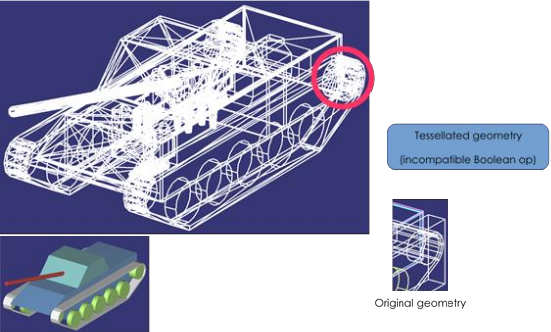
Figure 2. Tessellation of incompatible entities
Comparing Geometry
When developing a filter, it is often useful to be able to compare different models during testing. This capability is provided by the gdiff tool. There are two versions of gdiff: the standalone command-line version and the gdiff provided within the MGED interface.
The command-line gdiff quickly produces a textual summary for a two- or three- way diff of several BRL-CAD databases. Documentation for this utility is available under brlman gdiff.
The gdiff command available within the MGED interface provides a different capability. It uses BRL-CAD’s ray tracer to produce a visual display of the differences between two objects within the same database. To compare geometry from separate databases, you can first merge the databases using the dbconcat command from within MGED. See brlman dbconcat for full documentation.
Usage: |
|
|
Tolerance in millimeters. |
|
Test for differences with raytracing. |
|
Visualize volumes added only by left object. |
|
Visualize volumes common to both objects. |
|
Visualize volumes added only by right object. |
|
Report differences in grazing hits (raytracing mode). |
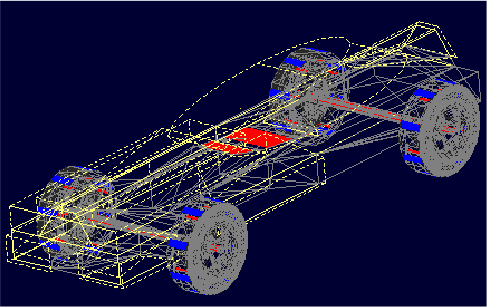
Figure 3. Using MGED’s gdiff utility
Creating Unit Tests
BRL-CAD provides a library of standard models that may be used for unit tests, located under $BRLCAD_ROOT/share/db/ (note that these files are generated during the build process). Unit tests can be integrated into the build system using the add_test CMake command.
Example: Extending an Application
The following example will leverage the filter in the above plugin example, tessellation_statistics.c, to implement a function that counts the number of faces in a model after tessellation.
Example 5. gcv_embedded.c
#include "common.h"

#include "bu/log.h"
#include "bu/mime.h"
#include "gcv.h"

/* Defined in tessellation_statistics.c, above. */
extern const struct gcv_filter gcv_conv_tess_stats;

/* Load the geometry file at 'in_path' into a fresh context, then run the
 * tessellation-statistics filter over it.  A GCV_FILTER_FILTER operates
 * on the geometry already in the context, so its target is NULL.
 * Returns 0 on success. */
int
report_tessellation_stats(const char *in_path)
{
    struct gcv_context context;
    const struct gcv_filter *in_filter;
    bu_mime_model_t in_type;

    gcv_context_init(&context);

    /* Import the input model into the context's in-memory database. */
    in_type = (bu_mime_model_t)bu_file_mime(in_path, BU_MIME_MODEL);
    in_filter = find_filter(GCV_FILTER_READ, in_type, in_path, &context);
    if (!in_filter || !gcv_execute(&context, in_filter, NULL, 0, NULL, in_path)) {
	bu_log("Failed to read '%s'\n", in_path);
	gcv_context_destroy(&context);
	return 1;
    }

    /* Run the filter; it tallies the faces and reports via bu_log(). */
    if (!gcv_execute(&context, &gcv_conv_tess_stats, NULL, 0, NULL, NULL)) {
	bu_log("Tessellation-statistics filter failed\n");
	gcv_context_destroy(&context);
	return 1;
    }

    gcv_context_destroy(&context);
    return 0;
}
The GCV Frontend
GCV includes a command-line front-end utility, gcv, implemented in src/conv/gcv/gcv.c. Full documentation is available under brlman gcv and gcv --help.
Example 6. Basic usage of the gcv utility
$ gcv --input=a.stl --output=b.fg4
Input file format: BU_MIME_MODEL_STL
Output file format: BU_MIME_MODEL_VND_FASTGEN
Input file path: a.stl
Output file path: b.fg4
    Converting Part: all_cpu_cpw6_cw_cpubox_cpubox.a
    Using solid name: s.all_cpu_cpw6_cw_cpubox_cpubox.a
    Making region (all_cpu_cpw6_cw_cpubox_cpubox.a)
...
Example 7. Generic options
$ gcv --input=a.fg4 --output=b.vrml --input-and-output-opts --verbosity=1 --output-only-opts --objects=comp_0001.r
Example 8. Filter-specific options
$ gcv --input=a.fg4 --output=b.obj --input-only-opts --colors=a.fg4.colors --output-only-opts --vertex-normals
Example 9. Specifying conversion formats
$ gcv --input=infile.txt --output=outfile.obj --input-format=stl
Conversion Filters
GCV currently contains support for import and export into five model formats, detailed below.
Format |
File Extension |
BRL-CAD |
|
FASTGEN4 |
|
WaveFront Object |
|
StereoLithography |
|
Virtual Reality Modeling Language |
|
Common Conversion Options
The gcv_opts struct stores generic options applying to many filters, detailed below. Not all options may be applicable to or respected by every filter.
|
Print debugging info if set to |
|
Verbosity level. The default, level |
|
Specify the scale factor to be applied during import or export, as units per mm. Default is |
|
Calculational tolerance. Defaults to the RT defaults. If you use a non-default value, you should set the ray tracer tolerance to match it when using the resulting model. |
|
Tessellation tolerance. The default value is: |
|
Specify use of either the default, marching-cubes, or bottess-based tessellation algorithm. |
|
Maximum number of processors to utilize where possible. Default is |
|
Number of objects to convert. If |
|
Names of objects to convert (must have |
|
Name assigned to objects without names. Defaults to “unnamed”. |
|
Debug flag for libbu (see |
|
Debug flag for librt (see |
|
Debug flag for libnmg (see |
Example 10. Using struct gcv_opts
static int
apply_filter_with_options(struct gcv_context *context, const struct gcv_filter *filter, const char *target)
{
    struct gcv_opts options;
    const char *argv[] = { "--colors=colors.dat", "--continue" };
    const size_t argc = sizeof(argv) / sizeof(argv[0]);

    gcv_opts_default(&options);
    options->debug_mode = 1;

    return gcv_execute(context, filter, &options, argc, argv, target);
}
FASTGEN4 Reader
|
Path to a file specifying component colors. |
|
Create a MUVES input file containing any CHGCOMP and CBACKING components. |
|
Create a libplot3 plot file of all CTRI and CQUAD elements processed. |
|
Process only a list (“3001, 4082, 5347”) or a range (“2315 - 3527”) of section IDs. |
FASTGEN4 Writer
At this time, the FASTGEN4 writer plugin does not make use of any filter-specific options.
OBJ Reader
|
Continue processing on nmg-bomb. Conversion will fall back to native BoT mode if a fatal error occurs when using the nmg or BoT-via-nmg modes. |
|
Fuse vertices that are near enough to be considered identical. Can make the solidity detection more reliable, but may significantly increase processing time during the conversion. |
|
Select which OBJ face grouping is used to create BRL-CAD primitives. |
|
Select the conversion mode. |
|
Thickness (mm) used when a BoT is not a closed volume and it’s converted as a plate or plate-nocos BoT. |
|
Ignore the normals defined in the input file when using native BoT conversion mode. |
|
Select the type used for BoTs that aren’t closed volumes. |
|
Creates a plot/overlay ( |
|
Select the BoT orientation mode. |
OBJ Writer
|
Output vertex normals. |
|
Place |
STL Reader
|
Specify that the input file is in binary STL format (the default assumes ASCII). |
|
Specify the starting ident for the regions created. The default is |
|
Specify that the starting ident should remain constant. |
|
Specify the material code that will be assigned to all created regions (the default is |
STL Writer
|
Write output as a binary STL file. The default is ASCII. In the case of ASCII output, the region name is specified on the "solid" line of the STL file. In the case of binary output, all the regions are output as a single STL part. |
|
Specify that the output path should be a directory. Each region converted is written to a separate file. File names are constructed from the full path names of each region (the path from the specified object to the region). Any “/” characters in the path name are replaced by “@” characters and “.” and white space are replaced by “_” characters. |
VRML Reader
The native VRML reader accepts both VRML 1.0 and VRML97/2.0 files. VRML 1.0
imports preserve ordered property state, separator scoping, DEF/USE
instances, transformations, material colors, analytic cube, cone, cylinder,
and sphere geometry, and indexed polygon meshes. Concave polygons are
triangulated, and per-face material bindings are emitted as separate colored
regions.
VRML constructs that do not have a BRL-CAD equivalent or are not
implemented yet, including cameras, lights, textures, text, line sets,
and point sets, are accepted but do not produce objects. External
content referenced by WWWInline is not fetched during conversion.
The VRML reader plugin does not make use of any filter-specific options.
VRML Writer
|
BoT dump. Mutually exclusive with |
|
Evaluate all, CSG and BoTs. Mutually exclusive with |
Open Asset Import Library Reader
The Open Asset Import Library (assimp) is an open source library integrated into GCV, capable of loading and converting geometry from 45 3D file-formats.
.3d |
.gltf / .glb (1.0) |
.obj |
.3ds |
.gltf (2.0) |
.off |
.3mf |
.hmp |
.ogex |
.ac |
.ifc |
.ply |
.ac3d |
.lwo |
.pmx |
.acc |
.lws |
.q3o |
.ase |
.lxo |
.q3s |
.b3d |
.md2 |
.raw |
.blend |
.md3 |
.sib |
.bvh |
.md5 |
.smd |
.cms |
.mdc |
.stl |
.cob |
.mdl |
.x |
.dae |
.mesh / .mesh.xml |
.x3d |
.dxf |
.ms3d |
.xgl |
.fbx |
.nff |
.zgl |
|
Specify the starting ident for the regions created. The default is |
|
Specify that the starting ident should remain constant. |
|
Specify the material code that will be assigned to all created regions (the default is |
|
Specify the file format for conversion. By default, this is inferred from the file extension. |
Example 11. Specifying the Asset Import reader
|
Note
|
As the Asset Import library handles many formats, some of which are also handled by other conversion methods, it currently must be explicitly called to invoke. The format itself is then inferred from the files extension. |
$ gcv --input-format=assetimport input_file.ext output_file.ext
Open Asset Import Library Writer
The Open Asset Import Library (assimp) is an open source library integrated into GCV, capable of exporting to 15 different 3D file-formats.
.3ds |
.fbx |
.pbrt |
.3mf |
.glb |
.ply |
.assbin (assetimport binary) |
.gltf |
.stl |
.assxml (assetimport xml) |
.json |
.stp |
.dae |
.obj |
.x3d |
|
Specify the file format for conversion. By default, this is inferred from the file extension. |
Example 12. Specifying the Asset Import writer
|
Note
|
As the Asset Import library handles many formats, some of which are also handled by other conversion methods, it currently must be explicitly called to invoke. The format itself is then inferred from the files extension. |
$ gcv --output-format=assetimport input_file.ext output_file.ext